How to See AI and Bot Traffic on Your Website (Using Microsoft Clarity)
We preach “data-driven decisions” constantly at Granular. But what happens when the data you need is invisible?
Right now, there is likely a constant stream of automated systems accessing your site, indexing content and prepping it for AI workflows, that your traditional client-side analytics tools simply can’t see.
It feels a bit like flying blind. But thankfully, Microsoft Clarity just turned the lights (at least dimly) on with their new AI Visibility dashboard.
In the age of AI and large language models, bot traffic isn’t just random noise anymore. It’s often the earliest signal of how your content is being discovered. Here is the breakdown on what this tool actually does, why it matters, and how to get it running. PLUS, at the end, I compared what the live “AI Traffic” data looks like between Clarity, SEMRush and GA4.
What Is AI Visibility?
First, this isn’t a tool for blocking bots. It’s a tool for visibility.
Most analytics (like GA4) use client-side scripts that only fire when a human loads a page in a browser. This new dashboard is different. It uses server-side logs to look at the “upstream” behavior, the requests hitting your server before a browser even gets involved.
This matters because robots don’t act like humans. They don’t “browse” in the traditional sense; they scan, index, summarize, or prepare content for AI workflows.
Essentially, this dashboard shows you the very first interaction between your content and the machine systems trying to read it.
What You’ll See in the Dashboard
Once enabled (I’ll cover the setup in a second), the dashboard provides immediate visibility into your server traffic.
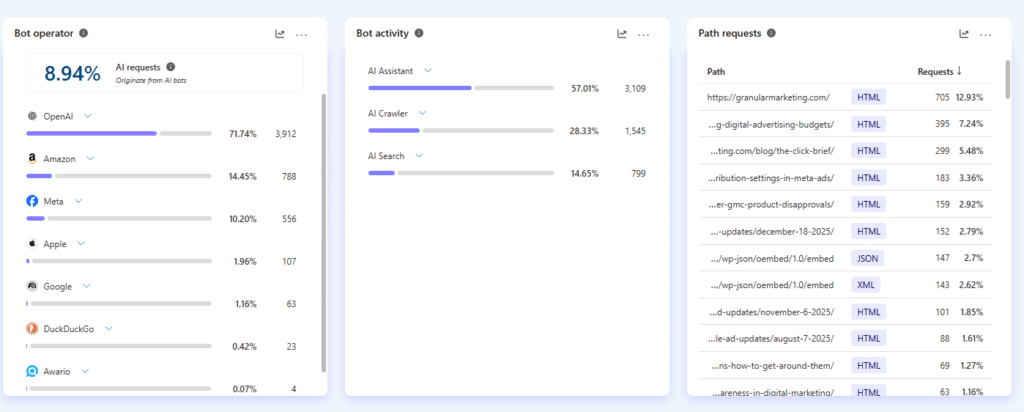
- Bot Operators: This answers the “Who?” question. Is it OpenAI? Google? A developer tool? It breaks down exactly which agents are visiting your site and compares their volume against your human users.
- AI Request Share: This calculates the percentage of your total requests coming specifically from AI bots versus humans, giving you instant context on your actual traffic mix.
- Bot Activity Categories: Clarity groups requests by intent so you know why they are visiting. You can quickly see if the traffic is from search indexers, AI assistants, or general data scrapers.
- Path Requests: Where is the traffic going? This highlights exactly which pages or assets (like images/JSON) bots are accessing most frequently.
Why This Matters To You
In this new AI era, your content might be accessed thousands of times by a machine before it ever shows up in a citation or a search result.
If you aren’t tracking this, you are missing the earliest warning signals.
With this dashboard, you stop guessing. You can identify “hotspots” where automation is most interested in your content, and you can spot patterns long before they show up in your downstream analytics like search traffic or AI referrals.
Bot Traffic ≠ AI Value (But It’s a Clue)
There is one really important thing to keep in mind, so you don’t panic (or celebrate) too early.
Seeing a bot crawl your page doesn’t mean the content was successfully used in an AI answer.
It just means access occurred. Think of these insights as early flags, not final proof of AI impact.
You should look for patterns over time and correlate this data with your search metrics, rather than taking it as a direct “conversion” metric.
How To Enable It
This feature requires a server-level integration, not just a simple toggle switch in the settings.
To get the data flowing, you must connect your site’s server or CDN logs to Clarity. It currently supports integrations with Cloudflare, Amazon CloudFront, Fastly, and WordPress (via the official plugin).
Note: While Clarity doesn’t charge for this feature, some CDN providers may charge for the logging configuration depending on your traffic volume. Check your plan before enabling.
Visibility Is Power
Running a website without bot visibility leaves you with significant blind spots. Automated systems are everywhere, indexing, scanning, and prepping for the next AI wave, and we wanted to see the impact for ourselves.
We recently implemented the AI Visibility detector on the Granular website to test it out in the wild. We are currently tracking the data to see how these new AI insights stack up against our traditional reporting in GA4 and SEMrush.
Here is what we are seeing from the last 7 days from each tool:
Microsoft Clarity:
GA4:
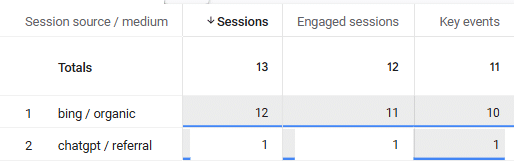
Still exploring other ways to do this. In this example I made a custom report based on session source. I also tried making a custom AI channel group, however, that also did not pull in much. My hypothesis is that some LLM traffic may be falling under referral.
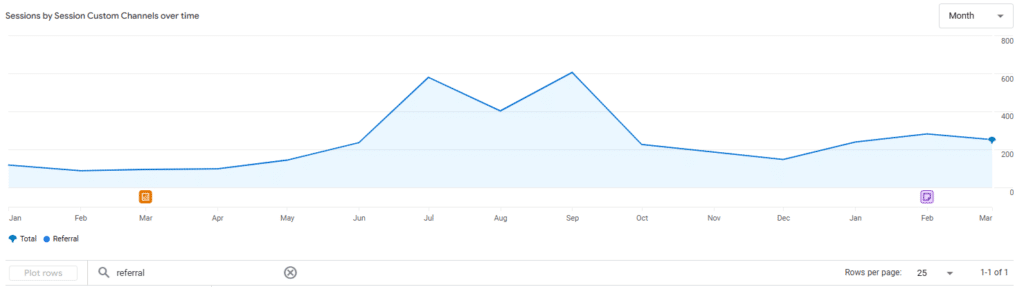
Granular has had a steady increase in referral traffic over time.
SEMRush:
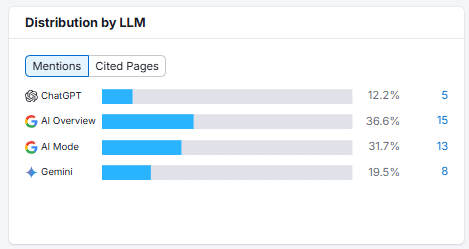
* Note – SEMRush did not give a date range for this data, nor really anything outside of this for our current subscription model. For additional AI Visibility data, you need to update to “Semrush One”
Conclusion
Is the data perfect? Not yet. But for the first time, we’re not completely in the dark. Microsoft Clarity is opening the door to understanding AI-driven traffic, and that alone makes it worth paying attention to. The brands that start watching these signals now will be the ones best positioned for what comes next.
Questions?
If you have any questions or are interested in having Granular help grow your business, please use the button below to get in touch!
Related Articles