How to Set Up an OpenAI Ad Account
Like most new platforms and features, Granular tests everything internally before recommending it to clients. So when OpenAI’s advertising platform Beta became available to run ChatGPT Ads, we jumped in and started setting up campaigns for Granular.
*Important budget update: ChatGPT / OpenAI ads minimum spend is only $25/day – not the $200,000/campaign budget that they introduced only a few months ago!
The initial setup process was pretty straightforward and there were not a lot of configuration options.
One area that caused some confusion was the question asking whether the account was for an agency. Since we are an agency, I originally selected that option because I wanted to structure the account in a way that would support future client management. However, after selecting it, the platform would not let me continue without first creating an advertiser account. I ended up moving forward with the standard setup instead.
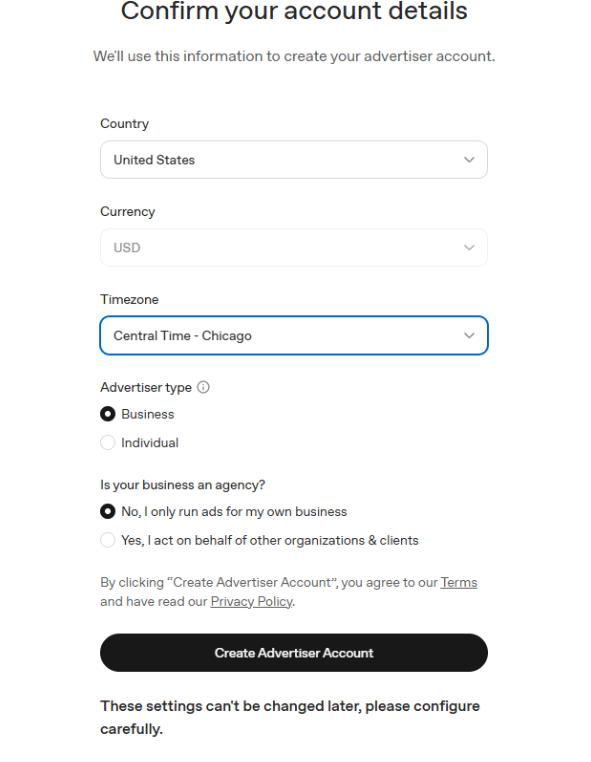

At least for now, it does not seem like a traditional “Business Manager” setup exists yet. Clients can add advertisers to accounts, but the structure is much more limited compared to platforms like Meta or Google Ads.
Once the account was created, I went into the settings section and added additional admins to the account.
Setting Up the OpenAI Pixel
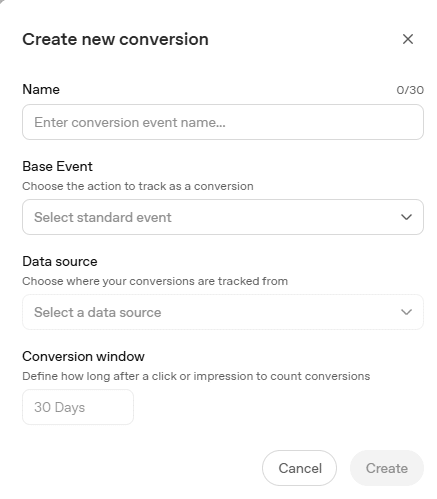
Next, I navigated to Tools > Conversions to create a new data source using the OpenAI pixel.
The platform prompts you to enter your website URL and then generates a code snippet to place inside the <head> section of your website. I added the code through a Custom HTML tag in Google Tag Manager.
From there, the platform prompts you to create conversion events. By default, conversion windows are set to 30 days.
Creating Your First Campaign
Once the pixel and conversions are configured, you are ready to launch your first campaign.
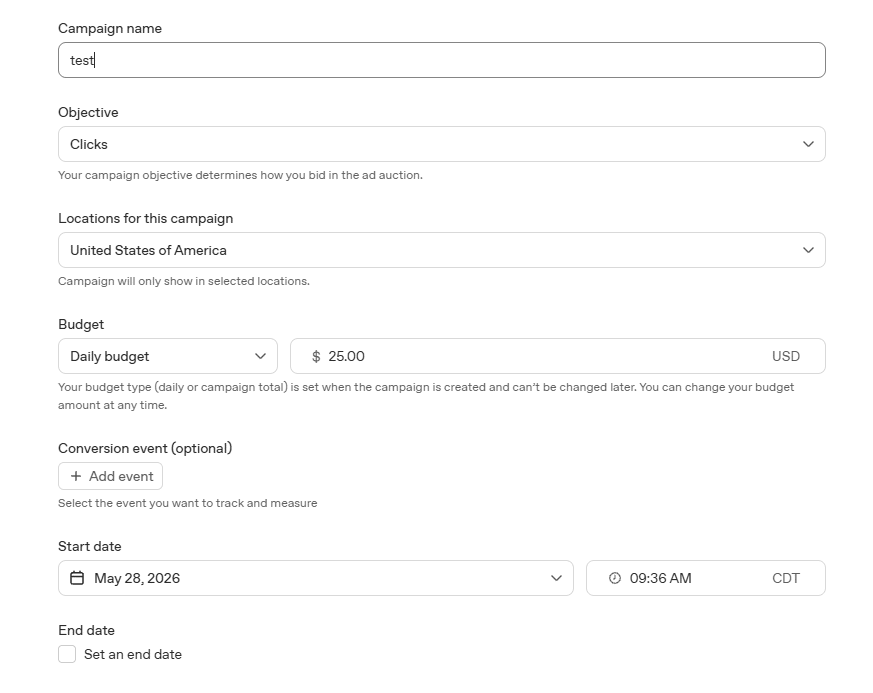
The campaign structure feels very similar to other ad platforms, with separate settings for campaigns, ad groups, and ads.
Campaign Objectives
Current objective options are limited to:
- Reach
- Clicks
Conversions are listed as “coming soon.” Based on the Beta email we received, conversion-focused campaigns are expected to launch in early June 2026.
Location Targeting
Location targeting is currently very broad. At the time of setup, the available targeting options were:
- United States
- Canada
- Australia
- New Zealand
There was no option for state-level, city-level, or regional targeting.
Bid Strategy
Bid strategy depends on the campaign objective selected.
For Reach campaigns, you set a maximum CPM bid. Our account defaulted to a recommended bid of $60.
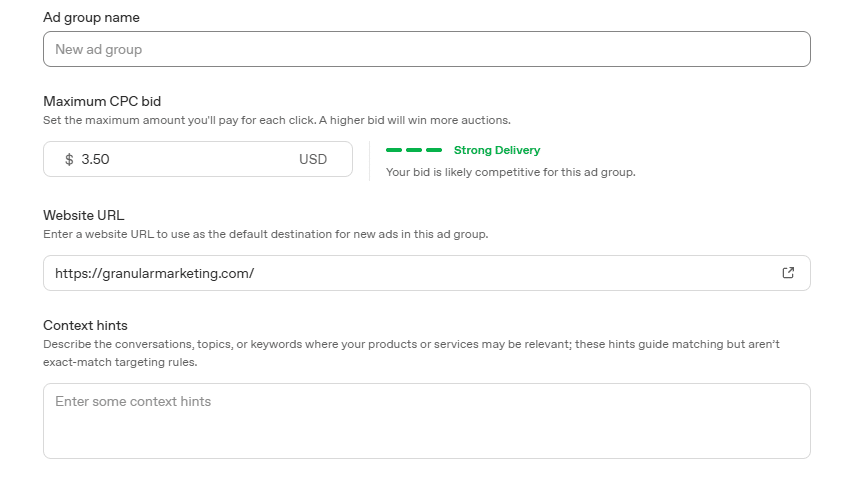
For Click campaigns, you set a maximum CPC bid. Our account defaulted to $3.50.
Additional Targeting Signals
At the ad group level, there is an option to add “Context Hints.”
OpenAI defines these as:
“Describe the conversations, topics, or keywords where your products or services may be relevant; these hints guide matching but aren’t exact-match targeting rules.”
This appears to function more as contextual guidance rather than traditional keyword targeting.
Ad Creation
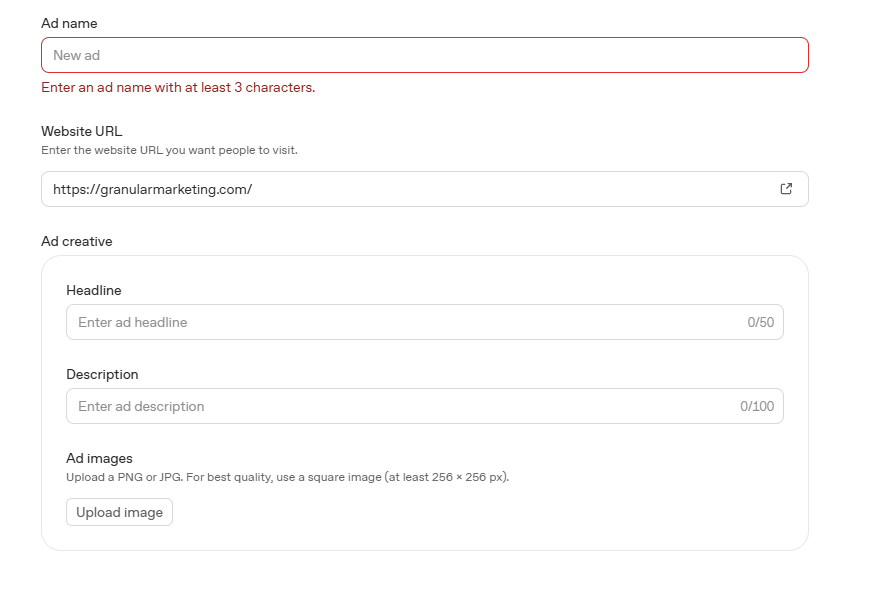
At the ad level, you can add:
- Headline
- Description
- Image
The setup is fairly minimal compared to more mature advertising platforms, but the process itself is simple and quick to navigate.
Since the platform is still in Beta, I would expect additional targeting, reporting, and campaign features to continue rolling out over time.
Where Will ChatGPT Ads Appear?
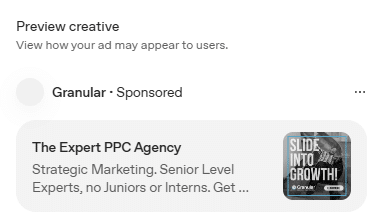
Ads are shown to users on the Free and Go plans. According to ChatGPT, ads are designed not to interrupt conversations and appear as a sponsored card directly beneath a ChatGPT response.
**Granular Goes Live on ChatGPT Ads**
We’re putting the finishing touches on our first ChatGPT ad campaign and expect to launch it soon. We’ll be sharing results and takeaways once we have enough data to evaluate performance.
If the channel delivers meaningful results, it’s something we’ll continue to invest in, build expertise around, and explore for clients where it makes sense as part of their marketing strategy.
Questions?
If you have any questions or are interested in having Granular help grow your business, please use the button below to get in touch!
Related Articles